
Bevor du das YAML übernimmst
Nimm den Code als Vorlage, nicht als blind kopierbaren Endzustand. Die entscheidenden Stellen solltest du vor dem Speichern an dein eigenes Setup anpassen.
- Laufendes Home Assistant
- custom:button-card
- Konfigurierter Media Player und Sender
Anleitung mit YAML · Fortgeschritten · Eigene Werte anpassen
- Entity-IDs und Bereiche
- Pfadnamen, Browser-IDs oder Helfer
- Installierte Custom Cards und Integrationen
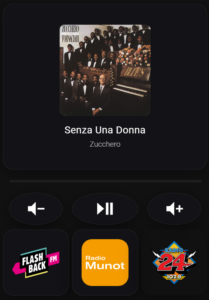
Komplettes Radio-Steuerungs-Interface
Weiter unten findet Ihr die Anpassungsanleitung.
Vor dem Einsetzen kurz prüfen
- Ersetze Entity-IDs, Pfade und Namen durch deine eigenen Werte.
- Prüfe, ob die genannte Card, Integration oder Erweiterung wirklich installiert ist.
- Teste die Änderung zuerst in einem kleinen Bereich, bevor du das ganze Dashboard umbaust.
  - type: masonry
    path: radio
    cards:
      - type: custom:button-card
        entity: media_player.kuche_2
        show_name: false
        show_state: false
        show_icon: false
        tap_action:
          action: none
        styles:
          card:
            - height: 400px
            - background: rgba(20, 20, 25, 0.75)
            - backdrop-filter: blur(10px)
            - border: 1px solid rgba(255, 255, 255, 0.08)
            - border-radius: 25px
            - box-shadow: 0 8px 32px rgba(0, 0, 0, 0.3)
            - padding: 30px
          custom_fields:
            logo:
              - position: absolute
              - top: 50px
              - left: 50%
              - transform: translateX(-50%)
              - width: 220px
              - height: 220px
            title:
              - position: absolute
              - bottom: 80px
              - left: 30px
              - right: 30px
              - text-align: center
              - font-size: 24px
              - font-weight: 400
              - color: white
              - letter-spacing: 0.5px
            artist:
              - position: absolute
              - bottom: 50px
              - left: 30px
              - right: 30px
              - text-align: center
              - font-size: 18px
              - font-weight: 300
              - color: rgba(255, 255, 255, 0.7)
        custom_fields:
          logo: |
            [[[
              const albumName = entity.attributes.media_album_name || '';
              const entityPicture = entity.attributes.entity_picture || '';
              const mediaContentId = entity.attributes.media_content_id || '';

              // Prüfe ob es Spotify ist
              if (mediaContentId.includes('spotify:')) {
                return `<img src="${entityPicture}">`;
              }

              // Sonst Radio-Logos
              let logoSrc = '/local/radio-logos/flashbackfm.png';

              if (albumName.includes('Flashback')) {
                logoSrc = '/local/radio-logos/flashbackfm.png';
              } else if (albumName.includes('Munot')) {
                logoSrc = '/local/radio-logos/radiomunot.png';
              } else if (albumName.includes('Radio 24')) {
                logoSrc = '/local/radio-logos/radio24.png';
              }

              return `<img src="${logoSrc}">`;
            ]]]
          title: |
            [[[
              return entity.attributes.media_title || 'Kein Titel';
            ]]]
          artist: |
            [[[
              return entity.attributes.media_artist || '';
            ]]]
      - type: custom:bubble-card
        card_type: separator
        card_layout: normal
      - type: vertical-stack
        cards:
          - square: false
            type: grid
            columns: 3
            cards:
              - show_name: false
                show_icon: true
                type: button
                icon: mdi:volume-minus
                tap_action:
                  action: call-service
                  service: media_player.volume_down
                  target:
                    entity_id: media_player.kuche_2
                card_mod:
                  style: |
                    ha-card {
                      height: 130px;
                      width: 130px;
                      background: rgba(20,20,25,0.75);
                      backdrop-filter: blur(12px);
                      border-radius: 50%;
                      border: 1px solid rgba(255,255,255,0.08);
                      box-shadow: 0 8px 28px rgba(0,0,0,0.35);
                      color: white;
                      margin: auto;
                    }
                    ha-card:active {
                      transform: scale(0.95);
                    }
                color: white
              - show_name: false
                show_icon: true
                type: button
                icon: mdi:play-pause
                tap_action:
                  action: call-service
                  service: media_player.media_play_pause
                  target:
                    entity_id: media_player.kuche_2
                color: white
                card_mod:
                  style: |
                    ha-card {
                      height: 130px;
                      width: 130x;
                      background: rgba(20,20,25,0.75);
                      backdrop-filter: blur(12px);
                      border-radius: 50%;
                      border: 1px solid rgba(255,255,255,0.08);
                      box-shadow: 0 8px 28px rgba(0,0,0,0.35);
                      color: white;
                      margin: auto;
                    }
                    ha-card:active {
                      transform: scale(0.95);
                    }
              - show_name: false
                show_icon: true
                type: button
                icon: mdi:volume-plus
                tap_action:
                  action: call-service
                  service: media_player.volume_up
                  target:
                    entity_id: media_player.kuche_2
                card_mod:
                  style: |
                    ha-card {
                      height: 130px;
                      width: 130px;
                      background: rgba(20,20,25,0.75);
                      backdrop-filter: blur(12px);
                      border-radius: 50%;
                      border: 1px solid rgba(255,255,255,0.08);
                      box-shadow: 0 8px 28px rgba(0,0,0,0.35);
                      color: white;
                      margin: auto;
                    }
                    ha-card:active {
                      transform: scale(0.95);
                    }
                color: white
          - square: true
            type: grid
            columns: 3
            cards:
              - show_name: false
                show_icon: false
                type: button
                tap_action:
                  action: call-service
                  service: media_player.play_media
                  target:
                    entity_id: media_player.kuche_2
                  data:
                    media_content_type: url
                    media_content_id: tunein--kqdEaHjB://radio/s303414
                icon: ''
                card_mod:
                  style: |
                    ha-card {
                      height: 300px;
                      margin-top: 4px;
                      margin-bottom: 4px;
                      background: rgba(20,20,25,0.75);
                      backdrop-filter: blur(16px);
                      border-radius: 26px;
                      border: 1px solid rgba(255,255,255,0.08);
                      box-shadow: 0 14px 45px rgba(0,0,0,0.4);
                      position: relative;
                      overflow: hidden;
                    }
                    ha-card::before {
                      content: "";
                      position: absolute;
                      inset: 14%;
                      background: url('/local/radio-logos/flashbackfm.png') center / contain no-repeat;
                    }
              - type: button
                show_name: false
                show_icon: false
                tap_action:
                  action: call-service
                  service: media_player.play_media
                  target:
                    entity_id: media_player.kuche_2
                  data:
                    media_content_type: url
                    media_content_id: tunein--kqdEaHjB://radio/s15496
                card_mod:
                  style: |
                    ha-card {
                      height: 300px;
                      margin-top: 4px;
                      margin-bottom: 4px;
                      background: rgba(20,20,25,0.75);
                      backdrop-filter: blur(16px);
                      border-radius: 26px;
                      border: 1px solid rgba(255,255,255,0.08);
                      box-shadow: 0 14px 45px rgba(0,0,0,0.4);
                      position: relative;
                      overflow: hidden;
                    }
                    ha-card::before {
                      content: "";
                      position: absolute;
                      inset: 14%;
                      background: url('/local/radio-logos/radiomunot.png') center / contain no-repeat;
                    }
              - type: button
                show_name: false
                show_icon: false
                tap_action:
                  action: call-service
                  service: media_player.play_media
                  target:
                    entity_id: media_player.kuche_2
                  data:
                    media_content_type: url
                    media_content_id: tunein--kqdEaHjB://radio/s2773
                card_mod:
                  style: |
                    ha-card {
                      height: 300px;
                      margin-top: 4px;
                      margin-bottom: 4px;
                      background: none;
                      backdrop-filter: blur(16px);
                      border-radius: 26px;
                      border: 0px solid rgba(255,255,255,0.08);
                      box-shadow: 0 14px 45px rgba(0,0,0,0.4);
                      position: relative;
                      overflow: hidden;
                    }
                    ha-card::before {
                      content: "";
                      position: absolute;
                      inset: 14%;
                      background: url('/local/radio-logos/radio24.png') center / contain no-repeat;
                    }
        grid_options:
          columns: 12
          rows: 5
    title: Radio
1. NOW PLAYING CARD (Große obere Karte)
Vor dem Einsetzen kurz prüfen
- Ersetze Entity-IDs, Pfade und Namen durch deine eigenen Werte.
- Prüfe, ob die genannte Card, Integration oder Erweiterung wirklich installiert ist.
- Teste die Änderung zuerst in einem kleinen Bereich, bevor du das ganze Dashboard umbaust.
- type: custom:button-card
  entity: media_player.kuche_2        # ← Dein Media Player
  show_name: false
  show_state: false
  show_icon: false
  tap_action:
    action: none                      # ← Kein Klick-Event
Was macht sie?
Zeigt das aktuell laufende Lied/Radio mit:
- Großes Logo (220x220px)
- Titel unten
- Künstler darunter
Design
Vor dem Einsetzen kurz prüfen
- Ersetze Entity-IDs, Pfade und Namen durch deine eigenen Werte.
- Prüfe, ob die genannte Card, Integration oder Erweiterung wirklich installiert ist.
- Teste die Änderung zuerst in einem kleinen Bereich, bevor du das ganze Dashboard umbaust.
styles:
  card:
    - height: 400px                   # Karten-Höhe
    - background: rgba(20, 20, 25, 0.75)  # Dunkler Hintergrund
    - backdrop-filter: blur(10px)     # Blur-Effekt
    - border: 1px solid rgba(255, 255, 255, 0.08)  # Dezenter Rahmen
    - border-radius: 25px             # Runde Ecken
    - box-shadow: 0 8px 32px rgba(0, 0, 0, 0.3)  # Schatten
    - padding: 30px                   # Innenabstand
Hintergrund:
rgba(20, 20, 25, 0.75)= Fast schwarz mit 75% Deckkraftblur(10px)= Weichzeichner-Effekt hinter der Karte
Logo-Position
Vor dem Einsetzen kurz prüfen
- Ersetze Entity-IDs, Pfade und Namen durch deine eigenen Werte.
- Prüfe, ob die genannte Card, Integration oder Erweiterung wirklich installiert ist.
- Teste die Änderung zuerst in einem kleinen Bereich, bevor du das ganze Dashboard umbaust.
custom_fields:
  logo:
    - position: absolute
    - top: 50px                       # 50px von oben
    - left: 50%                       # Horizontal zentriert
    - transform: translateX(-50%)     # Zentrierungs-Korrektur
    - width: 220px                    # Logo-Breite
    - height: 220px                   # Logo-Höhe
Logo-Logik (JavaScript)
const albumName = entity.attributes.media_album_name || '';
const entityPicture = entity.attributes.entity_picture || '';
const mediaContentId = entity.attributes.media_content_id || '';

// Spotify-Check
if (mediaContentId.includes('spotify:')) {
  // Zeige Spotify-Album-Cover
  return `<img src="${entityPicture}">`;
}

// Radio-Logo-Auswahl
let logoSrc = '/local/radio-logos/flashbackfm.png';  // Standard

if (albumName.includes('Flashback')) {
  logoSrc = '/local/radio-logos/flashbackfm.png';
} else if (albumName.includes('Munot')) {
  logoSrc = '/local/radio-logos/radiomunot.png';
} else if (albumName.includes('Radio 24')) {
  logoSrc = '/local/radio-logos/radio24.png';
}

return `<img src="${logoSrc}">`;
Logik:
- Prüft ob Spotify läuft → Zeigt Album-Cover
- Sonst: Prüft Radio-Sender-Name im Album-Name
- Wählt passendes Logo aus
Titel und Künstler
Vor dem Einsetzen kurz prüfen
- Ersetze Entity-IDs, Pfade und Namen durch deine eigenen Werte.
- Prüfe, ob die genannte Card, Integration oder Erweiterung wirklich installiert ist.
- Teste die Änderung zuerst in einem kleinen Bereich, bevor du das ganze Dashboard umbaust.
title:
  - bottom: 80px                      # 80px von unten
  - font-size: 24px                   # Größe
  - color: white                      # Farbe

artist:
  - bottom: 50px                      # 50px von unten
  - font-size: 18px
  - color: rgba(255, 255, 255, 0.7)  # Halbtransparent
Vor dem Einsetzen kurz prüfen
- Ersetze Entity-IDs, Pfade und Namen durch deine eigenen Werte.
- Prüfe, ob die genannte Card, Integration oder Erweiterung wirklich installiert ist.
- Teste die Änderung zuerst in einem kleinen Bereich, bevor du das ganze Dashboard umbaust.
title: |
  return entity.attributes.media_title || 'Kein Titel';

artist: |
  return entity.attributes.media_artist || '';
Holt Informationen aus dem Media Player:
media_title= Song-/Sendungs-Namemedia_artist= Künstler/Interpret
2. SEPARATOR (Trennlinie)
Vor dem Einsetzen kurz prüfen
- Ersetze Entity-IDs, Pfade und Namen durch deine eigenen Werte.
- Prüfe, ob die genannte Card, Integration oder Erweiterung wirklich installiert ist.
- Teste die Änderung zuerst in einem kleinen Bereich, bevor du das ganze Dashboard umbaust.
- type: custom:bubble-card
  card_type: separator
  card_layout: normal
Was macht sie?
- Visuelle Trennung zwischen Player und Controls
- Dünne horizontale Linie
3. CONTROL BUTTONS (Runde Steuerungs-Buttons)
Vor dem Einsetzen kurz prüfen
- Ersetze Entity-IDs, Pfade und Namen durch deine eigenen Werte.
- Prüfe, ob die genannte Card, Integration oder Erweiterung wirklich installiert ist.
- Teste die Änderung zuerst in einem kleinen Bereich, bevor du das ganze Dashboard umbaust.
- type: vertical-stack
  cards:
    - square: false
      type: grid
      columns: 3                      # 3 Buttons nebeneinander
Button-Struktur (alle 3 gleich)
Vor dem Einsetzen kurz prüfen
- Ersetze Entity-IDs, Pfade und Namen durch deine eigenen Werte.
- Prüfe, ob die genannte Card, Integration oder Erweiterung wirklich installiert ist.
- Teste die Änderung zuerst in einem kleinen Bereich, bevor du das ganze Dashboard umbaust.
- show_name: false
  show_icon: true
  type: button
  icon: mdi:volume-minus              # Icon
  tap_action:
    action: call-service              # Service aufrufen
    service: media_player.volume_down # Lautstärke runter
    target:
      entity_id: media_player.kuche_2
Die 3 Buttons:
| Button | Icon | Service | Funktion |
|---|---|---|---|
| Links | mdi:volume-minus | media_player.volume_down | Leiser |
| Mitte | mdi:play-pause | media_player.media_play_pause | Play/Pause |
| Rechts | mdi:volume-plus | media_player.volume_up | Lauter |
Button-Design
Vor dem Einsetzen kurz prüfen
- Ersetze Entity-IDs, Pfade und Namen durch deine eigenen Werte.
- Prüfe, ob die genannte Card, Integration oder Erweiterung wirklich installiert ist.
- Teste die Änderung zuerst in einem kleinen Bereich, bevor du das ganze Dashboard umbaust.
card_mod:
  style: |
    ha-card {
      height: 130px;
      width: 130px;                   # Rund: 130x130px
      background: rgba(20,20,25,0.75);
      backdrop-filter: blur(12px);
      border-radius: 50%;             # ← 50% = Kreis
      border: 1px solid rgba(255,255,255,0.08);
      box-shadow: 0 8px 28px rgba(0,0,0,0.35);
      color: white;
      margin: auto;                   # Zentriert
    }
    ha-card:active {
      transform: scale(0.95);         # ← Klick-Animation
    }
Design-Merkmale:
border-radius: 50%macht sie rundtransform: scale(0.95)beim Klick = Drück-Effektmargin: auto= automatisch zentriert
4. SENDER-BUTTONS (Große Radio-Sender-Karten)
Vor dem Einsetzen kurz prüfen
- Ersetze Entity-IDs, Pfade und Namen durch deine eigenen Werte.
- Prüfe, ob die genannte Card, Integration oder Erweiterung wirklich installiert ist.
- Teste die Änderung zuerst in einem kleinen Bereich, bevor du das ganze Dashboard umbaust.
- square: true
  type: grid
  columns: 3                          # 3 Sender nebeneinander
Sender-Button-Struktur
Vor dem Einsetzen kurz prüfen
- Ersetze Entity-IDs, Pfade und Namen durch deine eigenen Werte.
- Prüfe, ob die genannte Card, Integration oder Erweiterung wirklich installiert ist.
- Teste die Änderung zuerst in einem kleinen Bereich, bevor du das ganze Dashboard umbaust.
- show_name: false
  show_icon: false
  type: button
  tap_action:
    action: call-service
    service: media_player.play_media  # Medien abspielen
    target:
      entity_id: media_player.kuche_2
    data:
      media_content_type: url         # Stream-URL
      media_content_id: tunein--kqdEaHjB://radio/s303414  # ← TuneIn ID
Was passiert beim Klick?
- Ruft
media_player.play_mediaService auf - Sendet Stream-URL an
media_player.kuche_2 - Radio beginnt zu spielen
Stream-IDs der Sender
| Sender | TuneIn ID | Logo |
|---|---|---|
| Flashback FM | s303414 | /local/radio-logos/flashbackfm.png |
| Radio Munot | s15496 | /local/radio-logos/radiomunot.png |
| Radio 24 | s2773 | /local/radio-logos/radio24.png |
Button-Design
Vor dem Einsetzen kurz prüfen
- Ersetze Entity-IDs, Pfade und Namen durch deine eigenen Werte.
- Prüfe, ob die genannte Card, Integration oder Erweiterung wirklich installiert ist.
- Teste die Änderung zuerst in einem kleinen Bereich, bevor du das ganze Dashboard umbaust.
card_mod:
  style: |
    ha-card {
      height: 300px;                  # Hohe Buttons
      margin-top: 4px;
      margin-bottom: 4px;
      background: rgba(20,20,25,0.75);
      backdrop-filter: blur(16px);
      border-radius: 26px;
      border: 1px solid rgba(255,255,255,0.08);
      box-shadow: 0 14px 45px rgba(0,0,0,0.4);
      position: relative;
      overflow: hidden;               # Logo bleibt im Button
    }
Logo im Button (via ::before)
Vor dem Einsetzen kurz prüfen
- Ersetze Entity-IDs, Pfade und Namen durch deine eigenen Werte.
- Prüfe, ob die genannte Card, Integration oder Erweiterung wirklich installiert ist.
- Teste die Änderung zuerst in einem kleinen Bereich, bevor du das ganze Dashboard umbaust.
ha-card::before {
  content: "";                        # Pseudo-Element
  position: absolute;
  inset: 14%;                         # 14% Abstand von allen Seiten
  background: url('/local/radio-logos/flashbackfm.png') center / contain no-repeat;
}
Wie funktioniert das?
::beforeerstellt ein unsichtbares Element vor dem Card-Inhaltinset: 14%= 14% Abstand oben/unten/links/rechts (Logo ist zentriert)background: url(...)= Logo als Hintergrundcontain= Logo vollständig sichtbar, ohne Verzerrungno-repeat= Logo nur einmal anzeigen
Vorteil dieser Methode:
- Kein
- Logo ist Teil des Button-Styles
- Sauberer Code
Anpassungen
Media Player ändern
Überall wo media_player.kuche_2 steht:
entity: media_player.DEIN_PLAYER
Neuen Sender hinzufügen
- Neuen Button kopieren:
Vor dem Einsetzen kurz prüfen
- Ersetze Entity-IDs, Pfade und Namen durch deine eigenen Werte.
- Prüfe, ob die genannte Card, Integration oder Erweiterung wirklich installiert ist.
- Teste die Änderung zuerst in einem kleinen Bereich, bevor du das ganze Dashboard umbaust.
- type: button
  show_name: false
  show_icon: false
  tap_action:
    action: call-service
    service: media_player.play_media
    target:
      entity_id: media_player.kuche_2
    data:
      media_content_type: url
      media_content_id: tunein--kqdEaHjB://radio/DEINE_ID  # ← Neue ID
  card_mod:
    style: |
      ha-card {
        height: 300px;
        # ... (gleich wie oben)
      }
      ha-card::before {
        background: url('/local/radio-logos/NEUER_SENDER.png') center / contain no-repeat;
      }
- TuneIn ID finden:
- Gehe auf tunein.com
- Suche deinen Sender
- URL anschauen:
tunein.com/radio/SENDERNAME-s12345/ - Die Zahl
12345ist die ID - Komplette ID:
tunein--kqdEaHjB://radio/s12345
- Logo hochladen:
- Logo in
/config/www/radio-logos/speichern - Pfad:
/local/radio-logos/SENDERNAME.png
- Logo in
- Now Playing Card anpassen:
// Im logo-Bereich hinzufügen:
} else if (albumName.includes('DEIN SENDER')) {
  logoSrc = '/local/radio-logos/SENDERNAME.png';
}
Control-Buttons anpassen
Größere Buttons:
Vor dem Einsetzen kurz prüfen
- Ersetze Entity-IDs, Pfade und Namen durch deine eigenen Werte.
- Prüfe, ob die genannte Card, Integration oder Erweiterung wirklich installiert ist.
- Teste die Änderung zuerst in einem kleinen Bereich, bevor du das ganze Dashboard umbaust.
ha-card {
  height: 150px;
  width: 150px;
}
Andere Icons:
Vor dem Einsetzen kurz prüfen
- Ersetze Entity-IDs, Pfade und Namen durch deine eigenen Werte.
- Prüfe, ob die genannte Card, Integration oder Erweiterung wirklich installiert ist.
- Teste die Änderung zuerst in einem kleinen Bereich, bevor du das ganze Dashboard umbaust.
icon: mdi:skip-previous    # Zurück
icon: mdi:skip-next        # Weiter
icon: mdi:stop             # Stop
Andere Services:
Vor dem Einsetzen kurz prüfen
- Ersetze Entity-IDs, Pfade und Namen durch deine eigenen Werte.
- Prüfe, ob die genannte Card, Integration oder Erweiterung wirklich installiert ist.
- Teste die Änderung zuerst in einem kleinen Bereich, bevor du das ganze Dashboard umbaust.
tap_action:
  action: call-service
  service: media_player.media_next_track  # Nächster Track
Sender-Buttons Layout ändern
4 Buttons pro Reihe:
Vor dem Einsetzen kurz prüfen
- Ersetze Entity-IDs, Pfade und Namen durch deine eigenen Werte.
- Prüfe, ob die genannte Card, Integration oder Erweiterung wirklich installiert ist.
- Teste die Änderung zuerst in einem kleinen Bereich, bevor du das ganze Dashboard umbaust.
type: grid
columns: 4                    # 4 statt 3
2 Buttons pro Reihe:
columns: 2
Dann passen sich die Breiten automatisch an.
Höhere Buttons:
ha-card {
  height: 350px;              # Statt 300px
}
Now Playing Card anpassen
Kleinere Card:
Vor dem Einsetzen kurz prüfen
- Ersetze Entity-IDs, Pfade und Namen durch deine eigenen Werte.
- Prüfe, ob die genannte Card, Integration oder Erweiterung wirklich installiert ist.
- Teste die Änderung zuerst in einem kleinen Bereich, bevor du das ganze Dashboard umbaust.
styles:
  card:
    - height: 350px           # Statt 400px
Kleineres Logo:
Vor dem Einsetzen kurz prüfen
- Ersetze Entity-IDs, Pfade und Namen durch deine eigenen Werte.
- Prüfe, ob die genannte Card, Integration oder Erweiterung wirklich installiert ist.
- Teste die Änderung zuerst in einem kleinen Bereich, bevor du das ganze Dashboard umbaust.
logo:
  - width: 180px              # Statt 220px
  - height: 180px
Andere Hintergrundfarbe:
- background: rgba(0, 161, 136, 0.3) # Türkis transparent
Grid-Layout Optionen
Ganz unten im Code:
Vor dem Einsetzen kurz prüfen
- Ersetze Entity-IDs, Pfade und Namen durch deine eigenen Werte.
- Prüfe, ob die genannte Card, Integration oder Erweiterung wirklich installiert ist.
- Teste die Änderung zuerst in einem kleinen Bereich, bevor du das ganze Dashboard umbaust.
grid_options:
  columns: 12                 # 12 Spalten-Grid
  rows: 5                     # 5 Zeilen
Was bedeutet das?
- Das Dashboard nutzt ein 12-Spalten-Raster
- Karten können unterschiedlich viele Spalten belegen
- Ermöglicht flexible Layouts
Standard: Karten nutzen die volle Breite (alle 12 Spalten)
Zusammenfassung der Komponenten
| Komponente | Typ | Funktion |
|---|---|---|
| Now Playing | custom:button-card | Zeigt aktuellen Song/Sender |
| Separator | custom:bubble-card | Visuelle Trennung |
| Control Buttons | button in grid | Lautstärke & Play/Pause |
| Sender Buttons | button in grid | Radio-Sender starten |
Wichtige Code-Bereiche
Media Player Entity: Suche media_player.kuche_2 (4x im Code)
Stream-URLs: Suche media_content_id: bei den Sender-Buttons
Logo-Pfade: Suche url('/local/radio-logos/
Logo-Logik: Suche if (albumName.includes(
Button-Größen: Suche height: und width:
Farben: Suche rgba(
Aktualisierte Dashboard-Version
Diese Version stammt aus dem aktuellen YAML-Dashboard. Sie nutzt media_player.kuche_2, dynamische Logos, Lauftext für lange Titel, Play/Pause, Lautstärke und direkte Senderbuttons.
Kompletter aktueller Radio-View-Code
Vor dem Einsetzen kurz prüfen
- Ersetze Entity-IDs, Pfade und Namen durch deine eigenen Werte.
- Prüfe, ob die genannte Card, Integration oder Erweiterung wirklich installiert ist.
- Teste die Änderung zuerst in einem kleinen Bereich, bevor du das ganze Dashboard umbaust.
- title: Radio
path: radio
type: masonry
cards:
- type: vertical-stack
cards:
- type: custom:button-card
entity: media_player.kuche_2
show_name: false
show_state: false
show_icon: false
tap_action:
action: none
variables:
card_height: 230px
card_radius: 28px
cover_size: 164px
cover_left: 22px
cover_top: 22px
cover_radius: 20px
info_left: 192px
info_right: 20px
badge_bottom: 10px
font_title: 22px
font_artist: 14px
font_station: 12px
blur_amount: 4px
blur_opacity: "0.45"
scroll_duration_title: 20
scroll_duration_artist: 13
max_chars: 22
styles:
card:
- height: "[[[ return variables.card_height ]]]"
- border-radius: "[[[ return variables.card_radius ]]]"
- padding: 0
- overflow: hidden
- background: >-
linear-gradient(135deg, rgba(0,161,136,.28) 0%,
rgba(17,17,20,.98) 48%, rgba(17,17,20,.98) 100%)
- border: 1px solid rgba(255,255,255,.09)
- box-shadow: 0 16px 45px rgba(0,0,0,.45)
custom_fields:
cover:
- position: absolute
- left: "[[[ return variables.cover_left ]]]"
- top: "[[[ return variables.cover_top ]]]"
- width: "[[[ return variables.cover_size ]]]"
- height: "[[[ return variables.cover_size ]]]"
badge:
- position: absolute
- left: "[[[ return variables.cover_left ]]]"
- bottom: "[[[ return variables.badge_bottom ]]]"
- display: flex
- align-items: center
info:
- position: absolute
- left: "[[[ return variables.info_left ]]]"
- right: "[[[ return variables.info_right ]]]"
- top: 0
- bottom: 0
- display: flex
- flex-direction: column
- justify-content: center
custom_fields:
cover: |
[[[
const isPaused = entity.state !== 'playing';
const albumName = entity.attributes.media_album_name || '';
const mediaContentId = entity.attributes.media_content_id || '';
const entityPicture = entity.attributes.entity_picture || '';
let logoSrc = '/local/radio-logos/flashbackfm.png';
if (albumName.includes('Munot') || mediaContentId.includes('s15496') || entityPicture.includes('s15496'))
logoSrc = '/local/radio-logos/radiomunot.png';
if (albumName.includes('Radio 24') || mediaContentId.includes('s2773') || entityPicture.includes('s2773'))
logoSrc = '/local/radio-logos/radio24.png';
if (mediaContentId.includes('spotify:') && entityPicture)
logoSrc = entityPicture;
const blur = isPaused ? `filter:blur(${variables.blur_amount});opacity:${variables.blur_opacity};` : '';
return `<img src="${logoSrc}" style="width:100%;height:100%;object-fit:contain;border-radius:${variables.cover_radius};box-shadow:0 8px 24px rgba(0,0,0,.5);transition:filter .4s,opacity .4s;${blur}">`;
]]]
badge: |
[[[
const isPlaying = entity.state === 'playing';
if (isPlaying) {
return `
<style>
@keyframes _pulse{0%,100%{opacity:1;transform:scale(1)}50%{opacity:.4;transform:scale(.7)}}
@keyframes _eq{0%,100%{transform:scaleY(1)}50%{transform:scaleY(.2)}}
._dot{animation:_pulse 1.4s ease-in-out infinite}
._b1{animation:_eq .9s linear infinite}._b2{animation:_eq .7s linear infinite}
._b3{animation:_eq 1.1s linear infinite}._b4{animation:_eq .8s linear infinite}
._b5{animation:_eq 1.0s linear infinite}
</style>
<div style="display:flex;align-items:center;gap:6px;background:rgba(0,0,0,.35);border:1px solid rgba(0,220,180,.28);border-radius:20px;padding:5px 11px;">
<div class="_dot" style="width:7px;height:7px;border-radius:50%;background:#00dcb4;"></div>
<span style="font-size:11px;font-weight:700;letter-spacing:1.4px;color:#00dcb4;">LÄUFT GERADE</span>
<div style="display:flex;align-items:flex-end;gap:2px;height:14px;margin-left:4px;">
<div class="_b1" style="width:3px;height:6px;border-radius:2px;background:#00dcb4;transform-origin:bottom;"></div>
<div class="_b2" style="width:3px;height:12px;border-radius:2px;background:#00dcb4;transform-origin:bottom;"></div>
<div class="_b3" style="width:3px;height:8px;border-radius:2px;background:#00dcb4;transform-origin:bottom;"></div>
<div class="_b4" style="width:3px;height:13px;border-radius:2px;background:#00dcb4;transform-origin:bottom;"></div>
<div class="_b5" style="width:3px;height:5px;border-radius:2px;background:#00dcb4;transform-origin:bottom;"></div>
</div>
</div>`;
} else {
return `
<div style="display:flex;align-items:center;gap:6px;background:rgba(0,0,0,.35);border:1px solid rgba(255,255,255,.12);border-radius:20px;padding:5px 11px;">
<span style="font-size:11px;font-weight:700;letter-spacing:1.4px;color:rgba(255,255,255,.4);">PAUSIERT</span>
</div>`;
}
]]]
info: |
[[[
const isPlaying = entity.state === 'playing';
const station = (() => {
const a = entity.attributes.media_album_name || '';
const c = entity.attributes.media_content_id || '';
if (a.includes('Munot') || c.includes('s15496')) return 'Radio Munot';
if (a.includes('Radio 24') || c.includes('s2773')) return 'Radio 24';
if (a.includes('Flashback') || c.includes('s303414')) return 'Flashback FM';
return a || 'Radio';
})();
if (!isPlaying) {
return `
<div style="font-size:13px;color:rgba(255,255,255,.35);margin-bottom:10px;">${station}</div>
<div style="font-size:18px;font-weight:600;color:rgba(255,255,255,.45);margin-bottom:6px;">Pausiert</div>
<div style="font-size:12px;color:rgba(0,220,180,.75);">Doppelklick zum Starten</div>`;
}
const title_raw = entity.attributes.media_title || 'Radio';
const artist_raw = entity.attributes.media_artist || 'Bereit zum Abspielen';
const isMunot = (entity.attributes.media_album_name || '').includes('Munot') ||
(entity.attributes.media_content_id || '').includes('s15496');
const title = isMunot ? artist_raw : title_raw;
const artist = isMunot ? title_raw : artist_raw;
const maxChars = variables.max_chars;
const titleLong = title.length > maxChars;
const artistLong = artist.length > maxChars;
return `
<style>
@keyframes _mq{0%,18%{transform:translateX(0)}82%,100%{transform:translateX(-50%)}}
._mqt{animation:_mq ${variables.scroll_duration_title}s ease-in-out infinite;display:inline-block;white-space:nowrap;}
._mqa{animation:_mq ${variables.scroll_duration_artist}s ease-in-out infinite;display:inline-block;white-space:nowrap;}
</style>
<div style="font-size:${variables.font_station};color:rgba(255,255,255,.4);margin-bottom:10px;">${station}</div>
<div style="overflow:hidden;margin-bottom:7px;">
${titleLong
? `<span class="_mqt" style="font-size:${variables.font_title};line-height:1.25;font-weight:700;color:white;">${title} ${title}</span>`
: `<span style="font-size:${variables.font_title};line-height:1.25;font-weight:700;color:white;white-space:nowrap;">${title}</span>`
}
</div>
<div style="overflow:hidden;">
${artistLong
? `<span class="_mqa" style="font-size:${variables.font_artist};color:rgba(255,255,255,.65);font-weight:300;">${artist} ${artist}</span>`
: `<span style="font-size:${variables.font_artist};color:rgba(255,255,255,.65);font-weight:300;white-space:nowrap;">${artist}</span>`
}
</div>`;
]]]
- type: horizontal-stack
cards:
- type: custom:button-card
icon: mdi:volume-minus
show_name: false
tap_action:
action: call-service
service: media_player.volume_down
target:
entity_id: media_player.kuche_2
variables:
btn_height: 68px
btn_radius: 20px
btn_margin_top: 10px
btn_icon_size: 26px
styles:
card:
- height: "[[[ return variables.btn_height ]]]"
- border-radius: "[[[ return variables.btn_radius ]]]"
- background: rgba(17,17,20,.96)
- border: 1px solid rgba(255,255,255,.08)
- box-shadow: 0 6px 18px rgba(0,0,0,.3)
- margin-top: "[[[ return variables.btn_margin_top ]]]"
icon:
- color: rgba(255,255,255,.6)
- width: "[[[ return variables.btn_icon_size ]]]"
- type: custom:button-card
entity: media_player.kuche_2
show_name: false
show_state: false
show_icon: false
tap_action:
action: call-service
service: media_player.media_play_pause
target:
entity_id: media_player.kuche_2
variables:
btn_height: 68px
btn_radius: 20px
btn_margin_top: 10px
play_icon_size: 32px
styles:
card:
- height: "[[[ return variables.btn_height ]]]"
- border-radius: "[[[ return variables.btn_radius ]]]"
- background: "linear-gradient(135deg, #00a188, #00dcb4)"
- border: none
- box-shadow: 0 6px 18px rgba(0,0,0,.3)
- margin-top: "[[[ return variables.btn_margin_top ]]]"
- overflow: hidden
custom_fields:
btn:
- position: absolute
- top: 0
- left: 0
- right: 0
- bottom: 0
- display: flex
- align-items: center
- justify-content: center
custom_fields:
btn: |
[[[
const icon = entity.state === 'playing' ? 'mdi:pause' : 'mdi:play';
return `<ha-icon icon="${icon}" style="--mdc-icon-size:${variables.play_icon_size};color:white;"></ha-icon>`;
]]]
- type: custom:button-card
icon: mdi:volume-plus
show_name: false
tap_action:
action: call-service
service: media_player.volume_up
target:
entity_id: media_player.kuche_2
variables:
btn_height: 68px
btn_radius: 20px
btn_margin_top: 10px
btn_icon_size: 26px
styles:
card:
- height: "[[[ return variables.btn_height ]]]"
- border-radius: "[[[ return variables.btn_radius ]]]"
- background: rgba(17,17,20,.96)
- border: 1px solid rgba(255,255,255,.08)
- box-shadow: 0 6px 18px rgba(0,0,0,.3)
- margin-top: "[[[ return variables.btn_margin_top ]]]"
icon:
- color: rgba(255,255,255,.6)
- width: "[[[ return variables.btn_icon_size ]]]"
- type: custom:button-card
entity: media_player.kuche_2
show_name: false
show_icon: false
show_state: false
tap_action:
action: none
variables:
vol_height: 64px
vol_radius: 20px
vol_margin_top: 0px
vol_font_label: 13px
vol_font_value: 19px
vol_bar_height: 3px
styles:
card:
- height: "[[[ return variables.vol_height ]]]"
- border-radius: "[[[ return variables.vol_radius ]]]"
- background: rgba(17,17,20,.96)
- border: 1px solid rgba(255,255,255,.08)
- box-shadow: 0 6px 18px rgba(0,0,0,.3)
- margin-top: "[[[ return variables.vol_margin_top ]]]"
- overflow: hidden
- padding: 0
custom_fields:
vol:
- position: absolute
- top: 0
- left: 0
- right: 0
- bottom: 0
custom_fields:
vol: |
[[[
const v = Math.round((entity.attributes.volume_level || 0) * 100);
return `
<div style="width:100%;height:100%;display:flex;flex-direction:column;">
<div style="flex:1;display:flex;align-items:center;padding:0 20px;gap:12px;">
<svg viewBox="0 0 24 24" style="width:20px;height:20px;flex-shrink:0;fill:none;stroke:rgba(255,255,255,.5);stroke-width:1.8;stroke-linecap:round;stroke-linejoin:round;">
<polygon points="11 5 6 9 2 9 2 15 6 15 11 19 11 5"/>
<path d="M19.07 4.93a10 10 0 0 1 0 14.14M15.54 8.46a5 5 0 0 1 0 7.07"/>
</svg>
<span style="font-size:${variables.vol_font_label};color:rgba(255,255,255,.45);flex:1;">Lautstärke</span>
<span style="font-size:${variables.vol_font_value};font-weight:700;color:white;">${v}%</span>
</div>
<div style="height:${variables.vol_bar_height};background:rgba(255,255,255,.07);">
<div style="height:100%;width:${v}%;background:linear-gradient(90deg,#00a188,#00dcb4);transition:width .3s;"></div>
</div>
</div>`;
]]]
- type: grid
columns: 3
square: false
cards:
- type: custom:button-card
entity: media_player.kuche_2
show_name: false
show_icon: false
tap_action:
action: call-service
service: media_player.play_media
target:
entity_id: media_player.kuche_2
data:
media_content_type: url
media_content_id: tunein--kqdEaHjB://radio/s303414
variables:
station_id: s303414
logo: /local/radio-logos/flashbackfm.png
station_name: Flashback FM
station_height: 108px
station_radius: 20px
station_margin_top: 10px
station_logo_height: 58px
station_font: 9px
styles:
card:
- height: "[[[ return variables.station_height ]]]"
- border-radius: "[[[ return variables.station_radius ]]]"
- background: >-
[[[ const
a=(entity.attributes.media_content_id||'').includes(variables.station_id)&&entity.state==='playing';
return a?'rgba(0,161,136,.15)':'rgba(17,17,20,.96)'; ]]]
- border: >-
[[[ const
a=(entity.attributes.media_content_id||'').includes(variables.station_id)&&entity.state==='playing';
return a?'1px solid rgba(0,220,180,.4)':'1px solid
rgba(255,255,255,.08)'; ]]]
- box-shadow: 0 6px 18px rgba(0,0,0,.3)
- margin-top: "[[[ return variables.station_margin_top ]]]"
- padding: 14px
- overflow: hidden
custom_fields:
content:
- position: absolute
- top: 0
- left: 0
- right: 0
- bottom: 0
- display: flex
- flex-direction: column
- align-items: center
- justify-content: center
- gap: 8px
- padding: 14px
custom_fields:
content: |
[[[
const isActive = (entity.attributes.media_content_id||'').includes(variables.station_id) && entity.state === 'playing';
return `
<img src="${variables.logo}" style="width:100%;max-height:${variables.station_logo_height};object-fit:contain;">
<span style="font-size:${variables.station_font};font-weight:700;letter-spacing:1px;text-transform:uppercase;color:${isActive?'rgba(0,220,180,.85)':'rgba(255,255,255,.28)'};">${variables.station_name}</span>`;
]]]
- type: custom:button-card
entity: media_player.kuche_2
show_name: false
show_icon: false
tap_action:
action: call-service
service: media_player.play_media
target:
entity_id: media_player.kuche_2
data:
media_content_type: url
media_content_id: tunein--kqdEaHjB://radio/s15496
variables:
station_id: s15496
logo: /local/radio-logos/radiomunot.png
station_name: Radio Munot
station_height: 108px
station_radius: 20px
station_margin_top: 10px
station_logo_height: 58px
station_font: 9px
styles:
card:
- height: "[[[ return variables.station_height ]]]"
- border-radius: "[[[ return variables.station_radius ]]]"
- background: >-
[[[ const
a=(entity.attributes.media_content_id||'').includes(variables.station_id)&&entity.state==='playing';
return a?'rgba(0,161,136,.15)':'rgba(17,17,20,.96)'; ]]]
- border: >-
[[[ const
a=(entity.attributes.media_content_id||'').includes(variables.station_id)&&entity.state==='playing';
return a?'1px solid rgba(0,220,180,.4)':'1px solid
rgba(255,255,255,.08)'; ]]]
- box-shadow: 0 6px 18px rgba(0,0,0,.3)
- margin-top: "[[[ return variables.station_margin_top ]]]"
- padding: 14px
- overflow: hidden
custom_fields:
content:
- position: absolute
- top: 0
- left: 0
- right: 0
- bottom: 0
- display: flex
- flex-direction: column
- align-items: center
- justify-content: center
- gap: 8px
- padding: 14px
custom_fields:
content: |
[[[
const isActive = (entity.attributes.media_content_id||'').includes(variables.station_id) && entity.state === 'playing';
return `
<img src="${variables.logo}" style="width:100%;max-height:${variables.station_logo_height};object-fit:contain;">
<span style="font-size:${variables.station_font};font-weight:700;letter-spacing:1px;text-transform:uppercase;color:${isActive?'rgba(0,220,180,.85)':'rgba(255,255,255,.28)'};">${variables.station_name}</span>`;
]]]
- type: custom:button-card
entity: media_player.kuche_2
show_name: false
show_icon: false
tap_action:
action: call-service
service: media_player.play_media
target:
entity_id: media_player.kuche_2
data:
media_content_type: url
media_content_id: tunein--kqdEaHjB://radio/s2773
variables:
station_id: s2773
logo: /local/radio-logos/radio24.png
station_name: Radio 24
station_height: 108px
station_radius: 20px
station_margin_top: 10px
station_logo_height: 58px
station_font: 9px
styles:
card:
- height: "[[[ return variables.station_height ]]]"
- border-radius: "[[[ return variables.station_radius ]]]"
- background: >-
[[[ const
a=(entity.attributes.media_content_id||'').includes(variables.station_id)&&entity.state==='playing';
return a?'rgba(0,161,136,.15)':'rgba(17,17,20,.96)'; ]]]
- border: >-
[[[ const
a=(entity.attributes.media_content_id||'').includes(variables.station_id)&&entity.state==='playing';
return a?'1px solid rgba(0,220,180,.4)':'1px solid
rgba(255,255,255,.08)'; ]]]
- box-shadow: 0 6px 18px rgba(0,0,0,.3)
- margin-top: "[[[ return variables.station_margin_top ]]]"
- padding: 14px
- overflow: hidden
custom_fields:
content:
- position: absolute
- top: 0
- left: 0
- right: 0
- bottom: 0
- display: flex
- flex-direction: column
- align-items: center
- justify-content: center
- gap: 8px
- padding: 14px
custom_fields:
content: |
[[[
const isActive = (entity.attributes.media_content_id||'').includes(variables.station_id) && entity.state === 'playing';
return `
<img src="${variables.logo}" style="width:100%;max-height:${variables.station_logo_height};object-fit:contain;">
<span style="font-size:${variables.station_font};font-weight:700;letter-spacing:1px;text-transform:uppercase;color:${isActive?'rgba(0,220,180,.85)':'rgba(255,255,255,.28)'};">${variables.station_name}</span>`;
]]]