
Bevor du das YAML übernimmst
Nimm den Code als Vorlage, nicht als blind kopierbaren Endzustand. Die entscheidenden Stellen solltest du vor dem Speichern an dein eigenes Setup anpassen.
- Laufendes Home Assistant
- Mushroom Cards
- Eingerichtete Cover-Entity
Anleitung mit YAML · Mittel · Eigene Werte anpassen
- Entity-IDs und Bereiche
- Pfadnamen, Browser-IDs oder Helfer
- Installierte Custom Cards und Integrationen
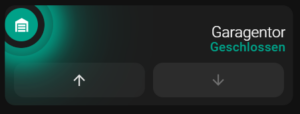
Ziel der Cover Card
Die Karte steuert ein Garagentor und macht die Zustände geschlossen, offen sowie in Bewegung deutlich unterscheidbar. Die Grundfunktion kommt von Mushroom Cover Card; das umfangreiche card_mod-Styling ist optional und sollte erst nach einer funktionierenden Basiskarte ergänzt werden.
Voraussetzungen
- Mushroom Cards und optional
card_modüber HACS. - Eine funktionierende
cover-Entity mit korrekt gemeldeten Zuständen. - Ein aktuelles Backup des Dashboards.
Zuerst die Basiskarte testen
Ersetze cover.garagentor durch deine Entity. Prüfe Öffnen, Stoppen und Schließen zunächst ohne zusätzliche CSS-Regeln.
Vor dem Einsetzen kurz prüfen
- Ersetze Entity-IDs, Pfade und Namen durch deine eigenen Werte.
- Prüfe, ob die genannte Card, Integration oder Erweiterung wirklich installiert ist.
- Teste die Änderung zuerst in einem kleinen Bereich, bevor du das ganze Dashboard umbaust.
type: custom:mushroom-cover-card
entity: cover.garagentor
show_buttons_control: true
fill_container: false
primary_info: name
secondary_info: state
show_position_control: false
show_tilt_position_control: false
hold_action:
  action: none
double_tap_action:
  action: none
tap_action:
  action: more-info
grid_options:
  columns: 12
  rows: 2
Statusdesign ergänzen
Der folgende optionale Block färbt geschlossen türkis, offen dunkelrot und Bewegungen orange. Animationen markieren ausschließlich Zustände, die Aufmerksamkeit benötigen.
Vor dem Einsetzen kurz prüfen
- Ersetze Entity-IDs, Pfade und Namen durch deine eigenen Werte.
- Prüfe, ob die genannte Card, Integration oder Erweiterung wirklich installiert ist.
- Teste die Änderung zuerst in einem kleinen Bereich, bevor du das ganze Dashboard umbaust.
card_mod:
  style:
    mushroom-shape-icon$: |
      .shape {
        {# ========== USER CONFIG ========== #}
        {% set state_entity = 'cover.garagentor' %}
        {# ========== END USER CONFIG ====== #}

        {% if is_state(state_entity, 'closed') %}
          {# GESCHLOSSEN = TÜRKIS #}
          --shape-color: rgb(0, 161, 136) !important;
          --icon-color: white !important;
          --shape-animation: none;
          opacity: 1;
          --glow-1: 0 0 25px 8px rgba(0, 161, 136, 1);
          --glow-2: 0 0 55px 18px rgba(0, 161, 136, 0.7);
          --glow-3: 0 0 95px 35px rgba(0, 161, 136, 0.45);
        {% elif is_state(state_entity, 'open') %}
          {# OFFEN = DUNKELROT #660000 + ANIMATION #}
          --shape-color: rgb(102, 0, 0) !important;
          --icon-color: white !important;
          --shape-animation: lock-open 1.6s ease-in-out infinite;
          opacity: 1;
          --glow-1: 0 0 25px 8px rgba(102, 0, 0, 1);
          --glow-2: 0 0 55px 18px rgba(102, 0, 0, 0.7);
          --glow-3: 0 0 95px 35px rgba(102, 0, 0, 0.45);
          --glow-anim: lock-ultraglow 2.2s ease-in-out infinite;
        {% elif is_state(state_entity, 'opening') or is_state(state_entity, 'closing') %}
          {# AKTION = ORANGE #}
          --shape-color: rgb(255, 165, 0) !important;
          --icon-color: white !important;
          --shape-animation: lock-action 0.7s ease-in-out infinite;
          opacity: 1;
          --glow-1: 0 0 25px 8px rgba(255, 165, 0, 1);
          --glow-2: 0 0 55px 18px rgba(255, 165, 0, 0.7);
          --glow-3: 0 0 95px 35px rgba(255, 165, 0, 0.45);
          --glow-anim: lock-ultraglow 2.2s ease-in-out infinite;
        {% else %}
          --shape-animation: none;
          --glow-1: none;
          --glow-2: none;
          --glow-3: none;
          --glow-anim: none;
          opacity: 0.6;
        {% endif %}

        transform-origin: 50% 50%;
        position: relative;
      }

      /* Glow layers */
      .shape::before,
      .shape::after {
        content: '';
        position: absolute;
        inset: -8px;
        border-radius: inherit;
        pointer-events: none;
      }

      .shape::before {
        box-shadow: var(--glow-1), var(--glow-2), var(--glow-3);
        animation: var(--glow-anim);
      }

      .shape::after {
        inset: -18px;
        box-shadow: var(--glow-1);
        opacity: 0.9;
        animation: var(--glow-anim);
      }

      @keyframes lock-ultraglow {
        0% {
          opacity: 0.9;
          filter: brightness(1);
        }
        50% {
          opacity: 1;
          filter: brightness(1.4);
        }
        100% {
          opacity: 0.9;
          filter: brightness(1);
        }
      }

      @keyframes lock-action {
        0%   { transform: rotate(-25deg) scale(0.96); }
        50%  { transform: rotate(25deg) scale(1.04); }
        100% { transform: rotate(-25deg) scale(0.96); }
      }

      @keyframes lock-open {
        0%   { transform: rotate(10deg); }
        50%  { transform: rotate(18deg); }
        100% { transform: rotate(10deg); }
      }
    mushroom-state-info$: |
      .container {
        --card-primary-font-size: 18px;
        --card-primary-font-weight: 300;
        --card-secondary-font-size: 15px;
        --card-secondary-font-weight: 500;
        margin-top: 15px;
        margin-left: 5px;
        text-align: right;
      }
      .primary {
        font-size: var(--card-primary-font-size) !important;
        font-weight: var(--card-primary-font-weight) !important;
        color: white !important;
      }
      .secondary {
        font-size: var(--card-secondary-font-size) !important;
        font-weight: var(--card-secondary-font-weight) !important;
        {% if is_state('cover.garagentor', 'closed') %}
          color: rgb(0, 161, 136) !important;
        {% elif is_state('cover.garagentor', 'open') %}
          color: rgb(102, 0, 0) !important;
        {% else %}
          color: rgb(255, 165, 0) !important;
        {% endif %}
        text-align: right;
      }
    .: |
      mushroom-shape-icon {
        --icon-size: 40px;
        display: flex;
        margin: -30px -10px -11px -9px !important;
        padding-right: 80px;
      }
      ha-card {
        clip-path: inset(0 0 0 0 round var(--ha-card-border-radius, 12px));
        border: none;
        margin-bottom: 12px;
        min-height: 120px !important;
        max-height: 120px !important;
        height: 120px !important;
        padding: 10px 0 !important;
      }
Sicherheitsregeln
- Ein Garagentor nie ausschließlich anhand der UI als sicher geschlossen betrachten.
- Für Fernzugriff eine zusätzliche Rückfrage oder separate Sicherheitslogik verwenden.
- Bei
unknownoderunavailablekeine sichere Farbe anzeigen. - Bedienung vor Ort testen und Hinderniserkennung des Torantriebs nicht umgehen.
Fehlersuche
- Wenn die Karte fehlt, zuerst die HACS-Ressource und den Browsercache prüfen.
- Wenn Farben nicht wechseln, die realen Zustandsnamen unter Entwicklerwerkzeuge kontrollieren.
- Wenn Animationen ruckeln, Glow-Ebenen reduzieren oder Animationen vollständig entfernen.